In real-world Dynamics 365 projects, many production issues don’t come from bad plugin code, but from choosing the wrong stage in the plugin execution pipeline. Developers often focus on what the code does, but not where it runs. Understanding how the plugin execution pipeline actually works is very important.
In this post, we’ll walk through the Dynamics 365 plugin execution pipeline using real-world scenarios, explain how transactions and rollback behave at each stage, and help you decide where your plugin logic truly belongs.
This post builds on our earlier discussion around Sync vs Async plugins, and focuses specifically on where plugins execute in the pipeline and why that matters.
What Is the Plugin Execution Pipeline in Dynamics 365
Every Create, Update, or Delete operation in Dynamics 365 passes through a defined execution pipeline. This pipeline determines when plugins run, whether they are part of a database transaction, and whether they can block or roll back an operation.
Plugins can be registered at different stages of this pipeline, and each stage has a very different impact on performance, rollback behavior, and user experience. Choosing the wrong stage often leads to unexpected failures in production
Overview of Plugin Execution Stages
At a high level, the plugin execution pipeline consists of three main stages: Pre-Validation, Pre-Operation, and Post-Operation. These stages define when your plugin code executes relative to the database transaction.

Understanding the plugin execution pipeline is crucial when troubleshooting recursive executions. If a plugin updates the same record during execution, it can trigger itself repeatedly and eventually result in a Plugin Depth Exceeded Error in Dynamics 365.
Pre-Validation Stage: Early Checks Before the Transaction Starts
The Pre-Validation stage runs before the database transaction begins. At this point, the platform has not yet locked records or started committing any data.
This stage is best suited for validations that must happen early, especially when the logic involves checks outside the current entity or even outside Dataverse.
In real projects, Pre-Validation is commonly used for cross-entity validations, permission checks, or scenarios where you want to block an operation as early as possible without touching the transaction itself.
If a plugin throws an exception in Pre-Validation, the operation is stopped immediately and no transaction is started. This makes it a powerful but often misunderstood stage.
Real-World Pre-Validation Plugin Example
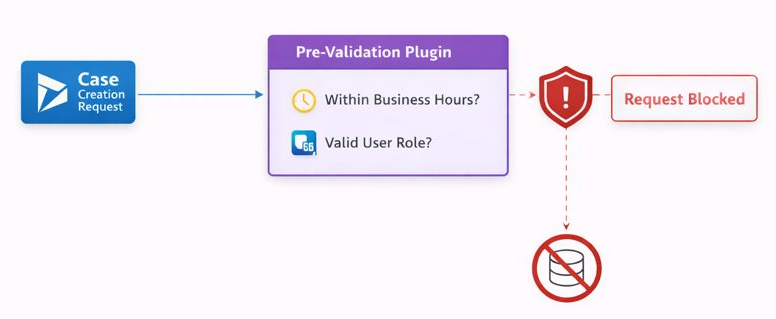
Real-Life Scenario: Prevent Case Creation Outside Business Hours
Business requirement:
A company does not want users to create Cases outside business hours (for example, after 8 PM or on weekends), except for users with a specific role.
This rule must be enforced before the system even starts processing the transaction.
Why Pre-Validation Is the Right Choice Here
Pre-Validation runs before the database transaction begins, which makes it ideal for:
- Time-based checks
- Permission checks
- External or environment-based validations
In this scenario:
- No data needs to be modified
- No related records are required
- The operation should be stopped as early as possible
What Happens in Practice
When a user tries to create a Case:
- The Pre-Validation plugin checks the current time and user role
- If the request violates the rule, an exception is thrown
- The Case is never processed further
- No transaction is started
- No rollback is required because nothing was committed
This keeps the system fast, clean, and predictable.
Why This Should NOT Be Pre-Operation
If this logic were placed in Pre-Operation:
- The transaction would already be open
- Database locks may already be held
- You waste system resources unnecessarily
Pre-Validation avoids all of that.
Use Pre-Validation when you want to stop an operation before Dataverse even touches the database.
Pre-Operation Stage: Modifying Data Inside the Transaction
The Pre-Operation stage runs inside the database transaction, just before the data is committed. This is one of the most commonly used stages in real-world Dynamics 365 projects.
At this stage, you can safely modify entity attributes, enforce business rules, and ensure data consistency. Because this stage runs within the transaction, any exception thrown here will cause a full rollback.
A typical real-world use case for Pre-Operation is preventing duplicate records, setting default field values, or enforcing mandatory business logic that must succeed before saving the record.
Real-World Pre-Operation Plugin Example
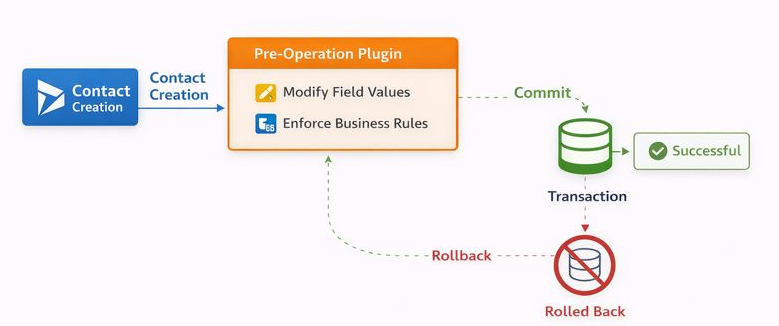
Scenario: Enforcing Business Rules and Default Values Before Saving a Contact
Business requirement:
When a Contact is created or updated in Dynamics 365, the system must enforce certain business rules and set default values before the record is saved. For example, if a Contact belongs to a specific Account type, the Contact priority must be set automatically, and missing mandatory business fields must be populated.
This logic must happen inside the transaction so that invalid or incomplete data is never saved.
Why Pre-Operation Is the Right Choice
Pre-Operation plugins execute after validation but before the database commit, which makes them ideal for scenarios where:
- Data needs to be modified before save
- Business rules must be enforced consistently
- Rollback is required if logic fails
At this stage, the entity is fully available, and changes made to the target entity are committed as part of the same transaction.
What Happens in Practice
When a user creates or updates a Contact:
- The request enters the transaction
- The Pre-Operation plugin executes
- Business rules are evaluated
- Field values are set or corrected
- The transaction commits only if everything succeeds
If the plugin throws an exception:
- The entire transaction is rolled back
- The Contact is not saved
- The user immediately sees an error
This guarantees data integrity and consistent enforcement of rules.
Why This Should NOT Be Pre-Validation
If this logic were placed in Pre-Validation:
- The entity data might not be fully available
- Modifying attributes would be unreliable
- Business rule enforcement would become fragile
Pre-Operation ensures the record is in the correct state before committing.
Why This Should NOT Be Post-Operation
If the logic were moved to Post-Operation:
- The record would already be saved
- Incorrect data could temporarily exist
- Rollback would no longer be possible
For core business rules, that risk is unacceptable.
Use Pre-Operation when you must modify data or enforce business rules and still need rollback protection.
Post-Operation Stage: After the Record Is Committed
The Post-Operation stage runs after the record has been committed to the database. At this point, the transaction is already complete and the data is saved.
This stage is ideal for logic that depends on the record already existing in the system, such as creating related records, triggering background processes, or preparing data for integrations.
A key thing many developers misunderstand is that rollback is no longer possible at this stage. If a plugin fails here, the original operation is not undone.
This distinction becomes critical in production systems where reliability and data integrity matter.
Real-World Post-Operation Plugin Example
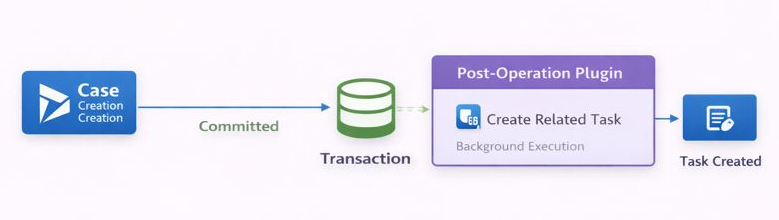
Scenario: Automatically Creating a Follow-Up Task After Case Creation
Business requirement:
When a Case is created in Dynamics 365, the system should automatically create a follow-up Task assigned to the case owner. This task helps ensure the case is reviewed within a defined SLA window.
This logic should not block the Case creation and should only run after the Case record is successfully saved.
Why Post-Operation Is the Right Choice
Post-Operation plugins execute after the database transaction is committed, which makes them ideal for scenarios where:
- The main record must already exist
- Related records need to reference the created record
- Rollback of the main operation is not required
In this scenario, the Case must exist first so that the follow-up Task can be correctly linked. Running this logic earlier would either fail or require unnecessary workarounds.
What Happens in Practice
When a user creates a Case:
- The Case is saved and committed to the database
- The Post-Operation plugin executes
- A related Task record is created and linked to the Case
- The user experience remains fast and uninterrupted
If the Post-Operation plugin fails:
- The Case remains created
- The failure is logged
- The issue can be fixed without impacting the original record
This makes Post-Operation plugins a safe and predictable choice for non-critical follow-up logic.
Why This Should NOT Be Pre-Operation
If this logic were implemented in Pre-Operation:
- The Case record would not yet exist
- You could not reliably create related records
- Any failure would unnecessarily roll back the Case creation
Post-Operation avoids all of these problems.
Use Post-Operation when your logic depends on the record already being saved and rollback is not required.
Where Sync and Async Plugins Fit in the Execution Pipeline
Execution stage and execution mode are two separate decisions, but they are closely related.
Synchronous plugins can run in Pre-Validation, Pre-Operation, or Post-Operation and will block the user until execution completes. Asynchronous plugins always run after the transaction is committed and execute in the background.
If you want a deeper explanation of execution modes, you can refer to our earlier post on Sync vs Async Plugin Dynamics 365, where we covered rollback behavior and performance in detail.
Conclusion: Designing Stable Plugins Starts with the Right Pipeline Stage
Understanding the Dynamics 365 plugin execution pipeline is the foundation of building stable and maintainable solutions. Writing correct plugin code is important, but placing that code in the correct stage is what prevents production failures.
When you design plugins with execution stages, transaction boundaries, and rollback behavior in mind, your solutions become more predictable, performant, and easier to support in the long run.
Quick Check: Can You Choose the Right Plugin Stage?
Question 1
A business rule must prevent record creation if a user lacks permission, and no data modification is required.
Which stage fits best?
Question 2
You need to modify field values before a record is saved and ensure rollback on failure.
Which stage should you use?
Question 3
A plugin creates related records after the main record is saved, and rollback is not required.
Which stage fits best?
Share your answers in the comments below. I’ll reply with feedback or clarifications where needed.