In previous articles, we explored:
Now we move to a critical concept that enables scalable and collaborative security:
Teams in Dataverse
Teams allow you to:
- Assign permissions to groups instead of individuals
- Share access across multiple users
- Simplify security management in large organizations
What Are Teams in Dataverse?
A Team is a group of users that can share:
- Security Roles
- Record ownership
- Access to data
Instead of assigning roles individually, you can assign them to a Team and let users inherit permissions.
Types of Teams
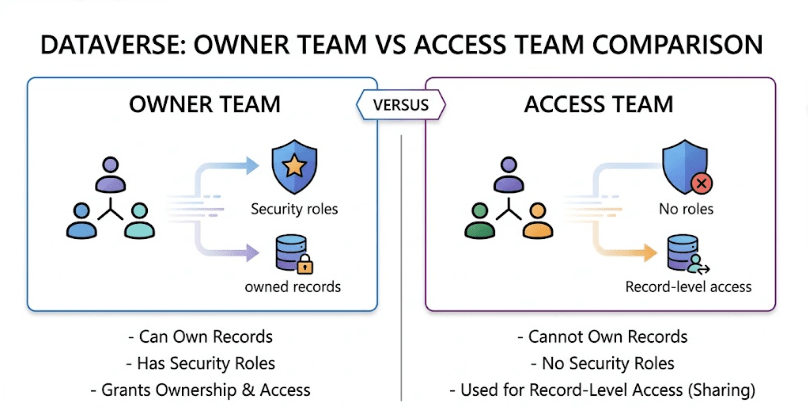
Dataverse has two main types of teams:
| Team Type | Purpose |
|---|---|
| Owner Team | Can own records and have security roles |
| Access Team | Used for record-level access (no roles) |
In this article, we focus on Owner Teams
(Access Teams will be covered in the next article)
Creating a Team in Dataverse
Teams are created within a Business Unit.
Steps to Create a Team
- Navigate to Settings → Users + Permissions → Team
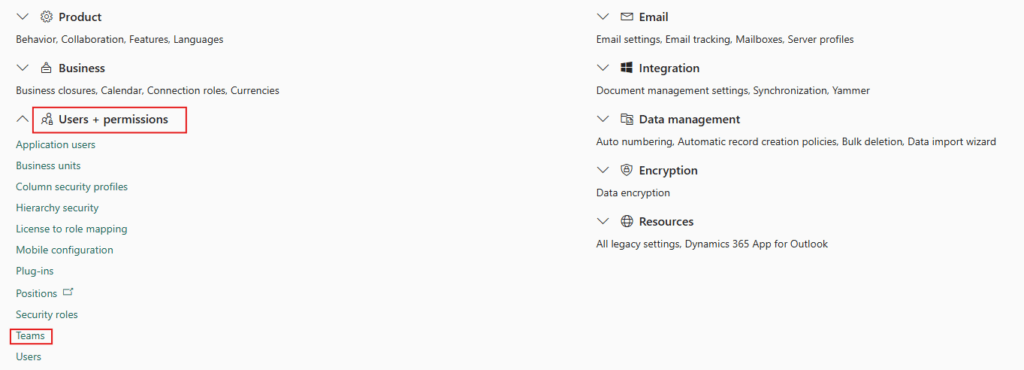
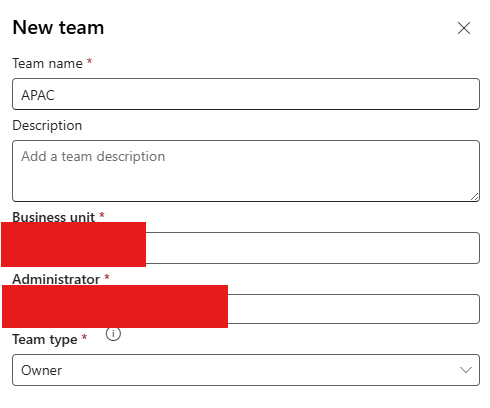
- Click New Team
- Enter:
- Team Name
- Business Unit
- Team Type (Owner)
Save the team
Assigning Security Roles to a Team
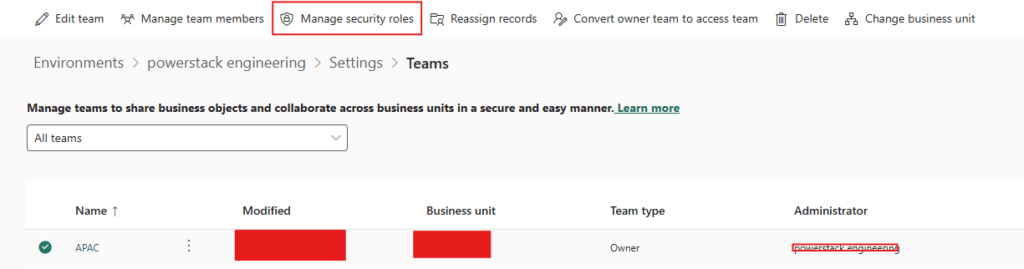
Just like users, teams can be assigned security roles.
Steps:
- Open the Team record
- Click Manage Roles
- Select required security roles
- Click Save
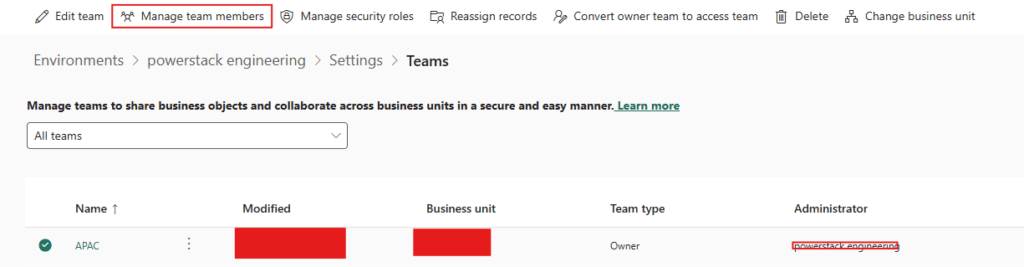
Adding Users to a Team
Users can be added to a team to inherit its permissions.
Steps:
- Open the Team
- Go to Members
- Click Add Members
- Select users
- Save
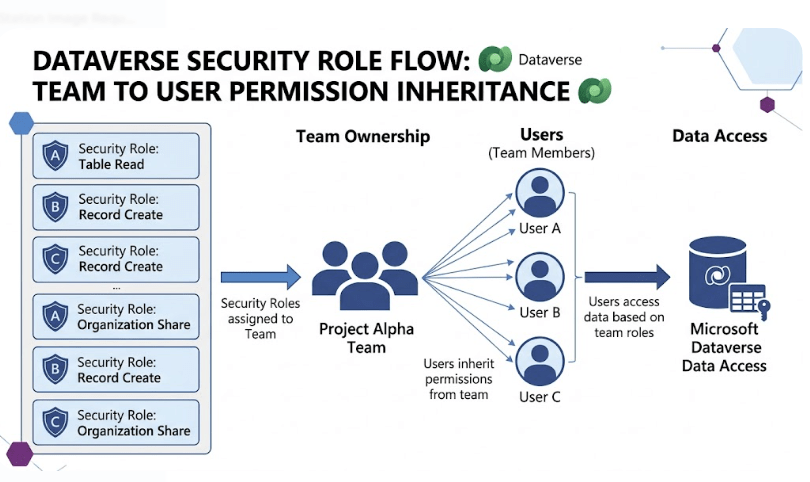
How Security Roles Flow from Team to User
This is the most important concept.
Users inherit security roles assigned to the team.
Flow:
Security Role → Team → User → Data Access
This means:
- Roles assigned to a team automatically apply to its members
- Users don’t need direct role assignment
- Permissions are combined with user roles
Direct Role vs Team Role
| Type | Description |
|---|---|
| Direct Role | Assigned directly to user |
| Team Role | Inherited from team |
Best practice:
Use teams for shared permissions instead of assigning roles individually.
Team Ownership of Records
Owner Teams can:
- Own records
- Share access across members
Example:
- Sales Team owns an Opportunity
- All team members can access it
Real-World Example
Consider a Sales organization.
Sales Team
- Assigned Sales Role
- Owns shared opportunities
Users
- Members of Sales Team
- Automatically inherit permissions
Result:
✔ Consistent access
✔ Easier management
✔ Scalable security
Common Mistakes
- Assigning roles individually instead of using teams
- Creating too many teams
- Not aligning teams with business functions
- Confusing owner teams with access teams
Best Practices
✔ Use Owner Teams for shared access
✔ Assign roles to teams instead of users
✔ Keep team structure aligned with departments
✔ Avoid unnecessary duplication
✔ Combine team + user roles carefully
Conclusion
Teams are a powerful component of the Dataverse security model.
They allow you to:
- Simplify permission management
- Enable collaboration
- Scale security across large organizations
When used correctly, teams significantly reduce complexity and improve maintainability.
Next in the Series
In the next article, we’ll explore:
Access Teams in Dataverse: Templates, Configuration, and Real-World Usage
This will cover advanced collaboration scenarios using Access Teams.