When registering a plugin in Dynamics 365 / Dataverse, writing correct code is only half the job.The other half and often the more confusing part is configuring the plugin registration step correctly.
Each field in the Plugin Registration Step decides:
- When your plugin executes
- On what data
- Under which conditions
- How often
In this article, we’ll break down each field in a plugin registration step, explain what it actually does, and share practical guidance to avoid common mistakes.
Prerequisites
Before reading this post, you should already be familiar with:
These topics are already covered on PowerStack Engineering and will be referenced, not re-explained.
What Is a Plugin Registration Step?
A plugin step defines the execution rule for a plugin class.
In simple terms:
A plugin assembly contains code,
but a plugin step tells Dataverse when and how to run that code.
Each step is configured using multiple fields, and each one matters.
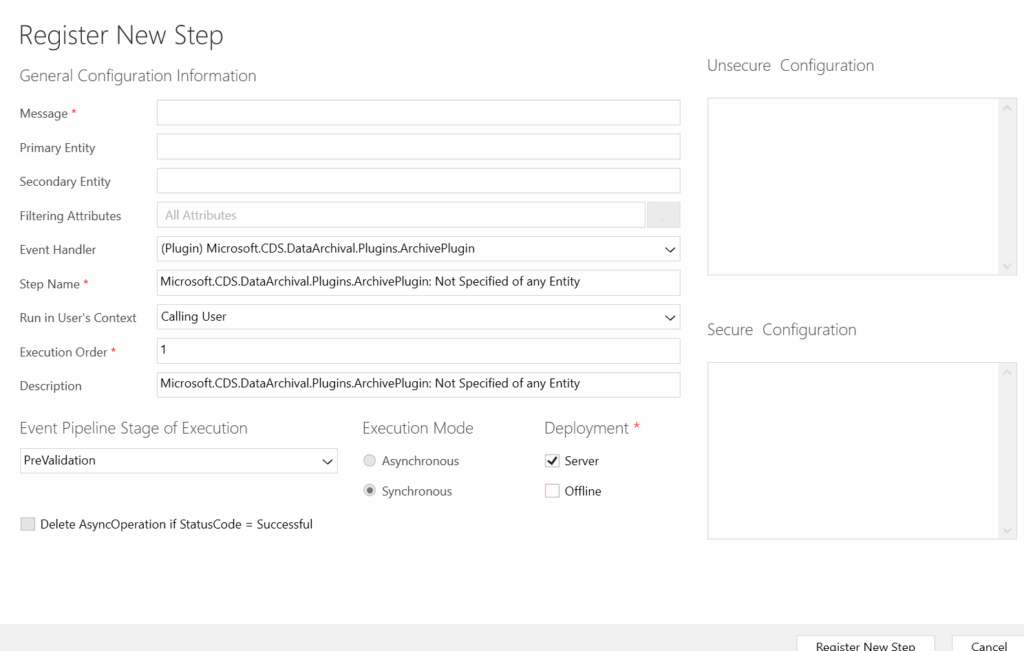
Plugin Registration Step – Overview
Before diving into individual fields like Message, Primary Entity, and Filtering Attributes, let’s first understand where these options appear and how they fit together.
When you register a plugin step using the Plugin Registration Tool, you’ll be presented with a configuration screen that defines when and how your plugin executes.
This screen contains multiple fields, each controlling a specific aspect of execution:
- Which operation triggers the plugin
- Which table the plugin applies to
- Which attributes should trigger execution
- Where in the pipeline the plugin runs
Below is a simplified representation of a typical Plugin Registration Step configuration.
💬 Quick Question
Have you ever had a plugin that didn’t fire at all, or fired far more times than expected?
Which registration field caused the issue for you?
Message
What is Message?
The Message defines which Dataverse operation will trigger the plugin.
Common messages include:
- Create
- Update
- Delete
- Retrieve
- RetrieveMultiple
- Assign
- SetState
Example
- Message =
Create - Plugin triggers only when a record is created
Important notes
- If the message is wrong, the plugin will never execute
- Message names are case-sensitive internally
Updateis the most commonly misconfigured message
Primary Entity
What is Primary Entity?
The Primary Entity specifies which table the plugin applies to.
Examples:
- account
- contact
- incident
- Custom table:
new_customentity
Example
- Message = Update
- Primary Entity = contact
- Plugin runs only when a Contact record is updated
Common mistakes
- Using display name instead of logical name
- Forgetting to set primary entity (leading to unexpected behavior)
Secondary Entity
What is Secondary Entity?
The Secondary Entity is used when:
- The message involves two entities
- The operation is relationship-based
Examples:
- Associate
- Disassociate
When it is used
- N:N relationship plugins
- Many-to-many association logic
When to ignore it
- Standard Create / Update / Delete scenarios
- Most plugins do not need a secondary entity
Filtering Attributes (Update Message Only)
What are Filtering Attributes?
Filtering attributes define which field changes should trigger the plugin during an Update.
Why this is important
Without filtering attributes:
- The plugin fires on every update
- Performance degrades
- Plugins may execute unexpectedly
Example
emailaddress1, mobilephone
Plugin triggers only if these fields change.
Best practice
- Always use filtering attributes for
Update - Never leave it empty unless absolutely required
Think About This
Do you usually define filtering attributes for
Updateplugins, or leave them empty?
Have you ever noticed performance issues because of this?
Stage
What is Stage?
The Stage defines where in the execution pipeline the plugin runs.
Common stages:
- Pre-Validation
- Pre-Operation
- Post-Operation
The full pipeline behavior is explained in a dedicated post on PowerStack Engineering.
Quick guidance
- Pre-Validation → block invalid requests
- Pre-Operation → modify data before save
- Post-Operation → act after data is committed
Execution Mode
What is Execution Mode?
Execution mode defines how the plugin runs:
- Synchronous
- Asynchronous
Key difference
- Sync plugins run inside the transaction
- Async plugins run after commit
Detailed comparison is already covered in the Sync vs Async plugin article.
Execution Order
What is Execution Order?
Execution Order determines which plugin runs first when multiple plugins exist for the same step.
Lower number = higher priority.
Example
- Plugin A → Order 10
- Plugin B → Order 20
Plugin A executes before Plugin B.
Best practice
- Keep execution order minimal
- Avoid complex chains unless necessary
Run in User Context
What is User Context?
This defines under which user’s security context the plugin executes.
Options:
- Calling user
- System user (if configured)
Why this matters
- Security roles affect data access
- Incorrect context can cause permission errors
Secure and Unsecure Configuration
When registering a plugin step, Dynamics 365 allows you to pass configuration data to your plugin without hardcoding values in the assembly.
This is done using:
- Unsecure Configuration
- Secure Configuration
These values are supplied at registration time and are available to the plugin at runtime.
Unsecure Configuration
Unsecure Configuration is:
- Stored in plain text
- Visible in Plugin Registration Tool
- Easy to modify without redeploying the plugin
Typical use cases
- Feature flags
- Non-sensitive settings
- Logical switches
- Environment-specific behavior
Example
enableValidation=true;minLength=5
Do not store secrets here.
Secure Configuration
Secure Configuration is:
- Encrypted in Dataverse
- Hidden from most users
- Editable only by users with appropriate privileges
Typical use cases
- API keys
- Connection strings
- Sensitive identifiers
Example:
apiKey=xxxxxxxxHow Secure and Unsecure Configuration Reach Your Plugin
Both secure and unsecure configuration values are passed to your plugin via the constructor, not via the execution context.
This is a very important concept and often misunderstood.
Reading Secure and Unsecure Configuration in Plugin Constructor
Below is a standard and recommended pattern used in real-world plugins.
Example Plugin Constructor
public class SamplePlugin : IPlugin
{
    private readonly string _unsecureConfig;
    private readonly string _secureConfig;

    public SamplePlugin(string unsecureConfig, string secureConfig)
    {
        _unsecureConfig = unsecureConfig;
        _secureConfig = secureConfig;
    }

    public void Execute(IServiceProvider serviceProvider)
    {
        // Plugin execution logic
    }
}
How to Use These Values Inside Execute
You can now:
- Parse configuration
- Apply conditional logic
- Read secrets safely
Example:
if (!string.IsNullOrWhiteSpace(_unsecureConfig))
{
    // Example: enableValidation=true
    if (_unsecureConfig.Contains("enableValidation=true"))
    {
        // Apply validation logic
    }
}

if (!string.IsNullOrWhiteSpace(_secureConfig))
{
    // Use secure data (e.g., API key)
}
Best Practices for Configuration Usage
- Use Unsecure Configuration for non-sensitive values
- Use Secure Configuration for secrets
- Never hardcode secrets in plugin code
- Avoid complex logic inside constructor
- Validate configuration values before use
Your Experience?
Have you ever hardcoded configuration values in a plugin and later regretted it?
How do you usually manage environment-specific values?
Common Plugin Registration Mistakes
Here are issues seen most often in real projects:
- Plugin not firing due to wrong message
- Plugin firing too often due to missing filtering attributes
- Wrong primary entity logical name
- Using async when sync is required
- Overusing post-operation logic
Understanding step configuration prevents 90% of plugin issues.
Code alone does not guarantee correct plugin behavior, registration does.
Putting It All Together
A correctly registered plugin step combines:
- Correct Message
- Correct Primary Entity
- Minimal Filtering Attributes
- Appropriate Stage
- Correct Execution Mode
Let’s Discuss
- Which plugin registration field do you find most confusing?
- Have you faced issues because of incorrect step configuration?
- What plugin topic should we cover next on PowerStack Engineering?
Conclusion
Plugin registration is not just a setup task — it’s a design decision.
Understanding Message, Primary Entity, Filtering Attributes, and execution settings ensures your plugins behave predictably, perform well, and remain maintainable.
Mastering plugin registration steps is what separates working plugins from production-ready plugins.
Plugin Registration – Interview Questions
If you’re preparing for a Dynamics 365 / Dataverse developer interview, or simply want to validate your understanding, try answering the questions below in the comments.
1️⃣ What is a plugin registration step, and why is it required even after writing plugin code?
2️⃣ What is the difference between Message and Primary Entity in a plugin step?
3️⃣ Why are Filtering Attributes important for Update plugins, and what happens if you leave them empty?
4️⃣ In which scenarios would you use a Secondary Entity during plugin registration?
5️⃣ What is the difference between Secure and Unsecure Configuration?
6️⃣ How are secure and unsecure configuration values accessed inside a plugin?
7️⃣ Can a plugin work correctly if it is registered with the wrong stage but correct code? Why or why not?
8️⃣ What are common mistakes developers make while registering plugin steps?
💬 Try answering these in the comments.
We’ll review selected answers and may even expand them into future posts on PowerStack Engineering.